The Echo Test service is used to test the SIP signals and audio streams of SIP phones. miniSIPServer supports two echo test modes.
Mode 1
After local users dial a specific call prefix *1001, their calls are routed to miniSIPServer. The server automatically answers the calls and sends the users' voice back to the callers in real time. By hearing their own voice playback, the users can confirm that their phones have been successfully registered and connected to miniSIPServer.
Mode 2
The user dials the specific call prefix *1002, the call is connected to miniSIPServer, and hangs up after completing the same test process as Mode 1. Then miniSIPServer automatically initiates a call to the user. After the user answers the call, server sends the user's voice back and complete the echo test again.
No additional configuration is required by default. Users can directly dial the prefix *1001 or *1002 to initiate a call and perform the echo test. However, during actual deployment, it may be necessary to use another prefix for making test calls, such as *666. In this case, you need to configure a Lua Service for the new prefix.
Please click the menu "Services – Lua services", and configure it as shown in the figure below:
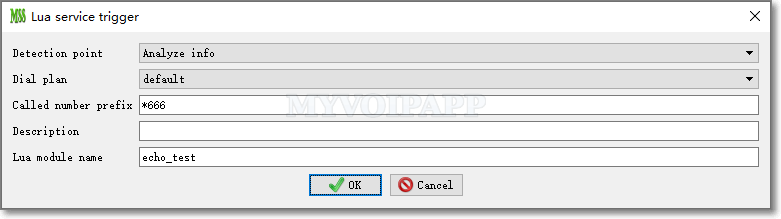
Set the key item Called Number Prefix to the new call prefix, which is *666 in this example. Set the Lua module name to echo_test for mode 1 or echo_test2 for mode 2. (Please refer to "manual document" for more details about Lua services.)